
If you like this post or find it even remotely helpful/informative, leave me a comment, tweet it, or click around on the site a bit with all that spare time you have (there’s no advertising anywhere on here – believe me it’s not for lack of trying). If none of that trips your trigger, then how about joining the Road Trip Revolution at the Solo Road Trip Facebook Fan Page, here.
There is also now a Shutterfly vs Snapfish, Take II.
*****************************
For me, shooting digital has resulted in a screeching halt of printing. I’m guessing it’s the same for you. A local commercial color printer continues to print the captures I want to add to my portfolio, but those are laughingly rare and consist largely from Western China and the Great Plains region of the U.S.
Having discovered Shutterfly a few years ago, I uploaded family photographs taken over that year and had personalized calendars made for Christmas gifts. They were a huge hit and I thought Shutterfly did a good job with them. After that, I began using them for all my printing and various fun photo projects (personalized calendars, coffee mugs, mouse pads, photo albums).
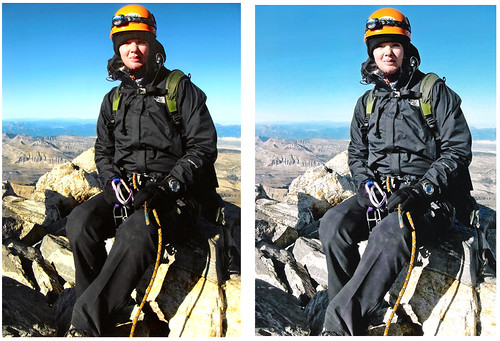
I’ve been happy with the prints, but Snapfish (by HP) caught my attention recently and I thought I’d give them a try. Of course, I wanted to compare, so I had both Snapfish and Shutterfly print identical photos of my 5.6 rated technical summit of Grand Teton.
The upload process was the same – both were fast and without fuss. The total spent at Snapfish for 8-4×6’s and 3-5×7’s, including shipping was $4.05. At Shutterfly, I ordered one more 5×7 by mistake. My total there was $7.67. Since it was my first order with Snapfish, the 4×6’s were free (20 free 4×6’s after your first upload). Shutterfly frequently offers similar deals. Comparing pricing, I surmise they are very similar, even though this order was more with Shutterfly (with the add’l 5×7). Shipping speed was the same- ordered on the same day, received both orders a few days later.
As cameras have dynamic ranges that see the scene differently (see this article on L’heure Bleue – The Blue Hour), printing 4×6’s can be very tricky. Most point-and-shoot cameras have a 4:3 aspect ratio. Translation: upon printing, a 4×6 photo will be cropped somewhere. The fix? Snapfish offers a 4×5.3 “True Digital” option that prints the photo with no cropping. But frames for a 4×6 will not work for this option. Furthermore, several online forums report there IS cropping, even on the 4×5.3 photos. And when I went back to Snapfish to find this option so I could better explain it to you, I couldn’t find it! Made me crazy.
Shutterfly allows you to select your own crop. So you choose the photo, then say you choose the 4×6 print option. A preview screen comes up showing the 4×6 area, and allows you to drag the photo around the space. This means you don’t get a photo back with the sunset at the top missing, or someone’s head cut off (see post about Bad Photography, or Good Photography with a Disposable Camera!). The 4×6 photo will also neatly fit into a frame.
So what about the most important factor – print quality? Shutterfly gets the nod hands-down. The color, ESPECIALLY the skin tones, is markedly BETTER than Snapfish. In the Snapfish photo, my face looks ghostly pale. In the Shutterfly photo, the blacks are blacker, the colors pop – like they’re supposed to.
Shutterfly will continue receiving my business (until someone else catches my attention and I have to do another comparison).
Here are the two photos – both scanned by my cheap-o scanner/printer/fax/copier purchased for $100 six years ago and still buzzing along quite nicely. Pay attention to the overall color, the blacks, and the skin tones.
It’sawesome in favor of me to have a website, which is useful in support of my know-how.
thanks admin
Comment by filmmaking a hundred and one, — May 20, 2014 @ 12:13 pm
Sanda is what people get in touch witth her but it’s not
the most feminine identify out there. He is really fond of takjng element in handball and now he has time to take on new factors.
Administering databases iis my day task now and I’m carryung out pretty
good financially. Washington has usually been her home but her husband would like them
to move.
Comment by cam edwards bio — May 19, 2014 @ 11:11 am
Sponsored by the Town of Taos more information on the Taos Express can be
obtained at 575-751-4459 or by visiting the official web site.
Several limo service providers have been helping customers find a car of their type.
Comment by http://sfist.com/2013/10/04/limo_chauffeur_hurt_during_mission.php — February 24, 2014 @ 1:40 pm
Hi, I’ve downloaded and activated this plugin on one of my sites. When I visit run the gedcom upload I get the prompt for your files and when I pick the file and hit the upload button all I get back after an extremely brief time could be the very same window with out the selection option. It doesn’t appear to get processed
something there aren’t any pages or files produced and there are no error/warning messages that I can see.Any thoughts I would want to get this going because it seems to be very handy for what i want.
Comment by hostgator email — August 24, 2013 @ 6:53 am
Hello There. I found your weblog using msn. This is an extremely smartly
written article. I’ll be sure to bookmark it and come back to read more of your helpful information. Thank you for the post. I will certainly return.
Comment by http://www.sunan-ampel.ac.id/ — July 19, 2013 @ 2:27 pm
Thanks for this great post and comparison of Shutterfly and Snapfish. I’ve been trying to decide which to use and your post is helpful– I love honest reviews of products! 🙂
Comment by Kaitlyn — June 25, 2013 @ 12:16 pm
I don’t even know how I ended up here, but I thought this post was good. I don’t
know who you are but definitely you’re going to a famous blogger if you are not already 😉 Cheers!
Comment by Grocery Coupons For Savannah Ga — April 30, 2013 @ 1:30 pm
Howdy just wanted to give you a quick heads up. The text in your content seem to be running off the screen in Opera.
I’m not sure if this is a formatting issue or something to do with web browser compatibility but I figured I’d
post to let you know. The design look great though! Hope you get the issue solved soon.
Kudos
Comment by i want my ex back but she has a boyfriend — April 9, 2013 @ 10:45 pm
Thank you for the energy you put into this!! It made for much less investigation for me!!
Comment by Robin — December 3, 2012 @ 1:27 pm
Thank you so much for the written comparison as well as photo sample comparison, I’m looking to print out some of my wedding photos as gifts this year and was looking for some quality and examples, and that’s exactly what I found in ur review. Can’t wait to place my order with shutterfly.
Comment by Jennifer — December 1, 2012 @ 10:49 pm
A little late to this party but every year I put together little photo albums for all the girls I coach in cheer. Last year I ordered late and the print quality from Snapfish was AWFUL! Too late to return or reprint so I was stuck. Going to give Shutterfly the chance this year. Thanks for your insight!
Comment by MB — November 6, 2012 @ 1:57 pm
Thanks for the comparison, it was exactly the information I needed!
Comment by Marie — September 19, 2012 @ 6:11 pm
Thank you for your clear explanation of the differences between Shutterfly & Snapfish! With some special wedding photos to display I will be choosing Shutterfly.
Comment by Joy — August 5, 2012 @ 9:24 am
Thank you so much. I have been using snapfish for my album for years and their quality is okay (not great), but I am going to switch over to shutterfly!
Comment by kate — July 29, 2012 @ 2:30 pm
Thanks for the research! Definitely helped me in figuring out where I’m taking my photos for print.
Comment by Jeremy — March 21, 2012 @ 6:00 pm
Hve you tried mpix? They are pricier but seem to have better quality.
Comment by Sere — March 6, 2012 @ 3:56 pm
[…] Shutterfly vs Snapfish […]
Pingback by Shutterfly: VividPics Technology — February 18, 2012 @ 1:37 pm
Very descriptive article, I enjoyed that bit. Will there be a second part to this?
Comment by Josh — January 17, 2012 @ 3:05 am
Incredible points. Outstanding arguments. Keep up the good spirit.
Comment by David — January 17, 2012 @ 2:41 am
Highly energetic article, I enjoyed that bit. Will there be a second part to this?
Comment by Lindsay — January 17, 2012 @ 2:40 am
Thanks! Very Helpful…
I also used to like Tiny Prints, which Shutterfly bought.
Julie
Comment by julie — January 6, 2012 @ 2:17 pm
Thanks for the comparison, it was just what I needed to assess switching from shutterfly to snapfish (Im staying with shutterfly)! Your comments are well articulated, realistic and helpful. Plus, your pictures rock.
Comment by TDH — December 27, 2011 @ 11:16 am
I have always used snapfish. I’m going to try shutterfly. Thank you for writing this. It is very clear and understandable.
Comment by rachel — December 13, 2011 @ 9:32 am
I used Shutterfly. You have to down load one pic at a time. Is that the same with snapfish, or can you copy the whole file at once.??
Comment by Jim — December 4, 2011 @ 10:45 am
I found your article really useful. I’ve used both services over the past few years and have definitely found Shutterfly extremely easy to use and very affordable. I tried Snapfish at one point … I think to get 100 free prints or something … and remember that I had some frustration building an album. There was some issue (and I’m racking my brain) with a shopping cart or something.
Anyway, Shutterfly has given me no reason to dislike their service … and I always thought the speed of shipping and expense were very reasonable.
Love the comments on here. Great suggestions for other vendors. I do sympathize with the “use your local camera store” guy, but I’m really to the point where I don’t want to drive anywhere to drop off or pick up. And if the local store is shipping from a corporate office somewhere, that seems like the same thing as going to Shutterfly. But I’d seriously be receptive to your arguments … as long as consistency and speed of delivery is in the mix.
Comment by Steve Anderson — October 10, 2011 @ 2:56 pm
This is my first experience ordering photos online. I was undecided between Snapfish and Shutterfly. Thanks for your comparison. I’m going to go with Shutterfly.
Comment by Victoria — October 4, 2011 @ 10:13 pm
Big help for sure. I’ll read part II, and this will make my decision. No cheap print is worth color loss.
Comment by Jonathan — October 2, 2011 @ 8:49 pm
In June 2009, I had Shutterfly print photos of my trip to Europe and was frustrated by the autocrop–I had several hundred photos and didn’t bother to go through them and specify where to crop or not crop. I’ve just been back to Europe and am now trying to decide whether to give Shutterfly another chance. I guess I should just spend the time going through every photo to avoid another disappointment, but I was really hoping some service somewhere would make it easy. Thanks for the insight.
Comment by Rbec — September 12, 2011 @ 10:18 am
I whole-heartedly agree! I have always used shutterfly, but used snapfish once because they offered my 100 free prints. I was very disappointed with the pictures! I was confused as to why some of them were different sizes.. and the coloring was terrible. There were even ink spots on some of them. Shutterfly will always have my vote.
Comment by sarah — July 21, 2011 @ 10:56 am
Thank you for the comparison. Never tried Snapfish, but have been thrilled with Shutterfly so felt no need to switch.
Comment by Judy — July 19, 2011 @ 7:08 am
@Todd,
As someone who worked in a local photo lab up until January (it closed due to business not being were the boss wanted and rent about to skyrocket), I am inclined to agree, Unfortunately, they are becoming too far in between and I would definitely forgo CVS, Walmart or Target if possible as their results are definitely not satisfactory (probably some exceptions). Best bet at this point is an online service. I would recommend sites like Mpix.com or Adorama as I have tested those out and they have sent me some really good prints.
Comment by Tony — July 18, 2011 @ 5:06 pm
You want the best results of all? SUPPORT A LOCAL CAMERA STORE!
Comment by Todd — February 14, 2011 @ 2:04 pm
Thank you so much for the comparison. I’ve been wondering myself and even thought of doing the same experiment. Thanks for saving me the trouble. Shutterfly it is!! Happy Holidays!
Comment by Michelle — December 3, 2010 @ 2:27 pm
Hey everyone,
While doing market research (My business is going online in the next month as a beta version), I came across this blog. To improve your satisfaction with prints I have a few questions. Would anyone be willling to share any of the following information?
1) Which printer do you use?
2) How many orders have you placed in the last year?
3) What was the average total, in price, for the orders?
4) What items were purchased?
5) What did you like and dislike about both the product and the service?
You can email me your response at JHirsh@Sephoco.com
Thank you
Josh Hirsh
Co-Founder
Sephoco, Inc.
Comment by Josh — November 25, 2009 @ 4:00 pm
I started using http://www.snapily.com for all my photo merchandising presents – non “regular” prints. They are using lenticular printing to create special effects like flip book style and 3D.
Comment by Dan — November 4, 2009 @ 4:52 am
Agreed….Down and dirty Shutterfly rocks.
Comment by John Batdorff — November 3, 2009 @ 12:20 am
I have been a shutterfly user for a while as well. Thanks for a great comparison! I also used to have snapfish in the past (when they had free promotion). I agree that the print quality from shutterfly is much better than snapfish.
Comment by Amy @ The Q Family — October 21, 2009 @ 12:29 pm
Sarah, I’ve never tried Photoworks. I’ll have to give them a whirl!
Joel, I’ll get right on the mug.
Monica, You know, I’m certain cameras make a difference. As does the particular day the prints were made, how fresh the inks are, temperature, humidity, how the stars were aligned, etc. LOL On any given day, one could be better than the other. There’s so many services out there. I’ve just found Shutterfly to be fairly consistent, but they’ve even sent me batches that didn’t look so hot (which I returned and they either reprinted or refunded the price).
Sheri, I will look into artscow.com. Very interested in this recommendation.
Comment by Tammie Dooley — October 20, 2009 @ 8:43 am
Thanks Tam (from Lisa) for the comparison, I have wondered about the later, good to know.
Comment by Clay Mama — October 19, 2009 @ 9:47 pm
Thanks for the comparison, Tammie.
Have you heard of artscow (dot com). They offer a whole bunch of free prints (it used to be 400, I think it’s up to 1200 now). You get 50 4×6 and 50 5×7 each month until your total freebies are used up.
They’re located in China, I think, so you pay a bit more for shipping. When I used them, 100 prints was about $10. At an average of 10¢ per print, I was ok with $10 shipping.
The quality was fine. I had no complaints. I wouldn’t use them for customer prints, but they were great for scrapbooking and my personal albums.
They also have a TON of cool products that are frequently offered free or greatly reduced. I can’t testify to the quality of any of the products, but they look good.
I’d be interested to see a comparison that includes artscow. If you try them out, try and let us know what you think.
Comment by Sheri Allison — October 19, 2009 @ 9:38 pm
that is very interesting. I wonder how much the camera has to do with it? I oredered the same set of photos from Shutterfly and Snapfish recently and skin tones were much more accurate with Snapfish. For some reason, my family looked unnaturally orange in the shutterfly pics. Will have to give them both a whirl again, because I prefer the shutterfly editing/uploading process.
Comment by monica — October 19, 2009 @ 8:32 pm
I want my MUG!
Comment by Joel — October 19, 2009 @ 3:59 pm
coffee mugs? Where the F$%# is my MUG?
Comment by Joel — October 19, 2009 @ 3:49 pm
Thanks for the comparison Tammie! Always helpful. I use PhotoWorks and think they are pretty good too. Haven’t done a straight comparison though.
Comment by Sarah Mayhew — October 19, 2009 @ 2:59 pm