
The first print comparison between Shutterfly and Snapfish resulted in a nod to Shutterfly. In the comparison color photo, the Shutterfly colors were vibrant and rich. Skin tones were more realistic. Details were clearer. Pop over and see the comparison, here.
Over the holidays I took a family photo that begged to be printed in Black & White. And since it was a photo to be used as a holiday card, professional printing wasn’t necessary. “So”, I thought to myself, we need to do another Snapfish vs Shutterfly print comparison – this time for B&W.
I see a lot of photos termed B&W that are really a presentation of a rainbow of grays. A perfectly printed and eye appealing B&W photo contains some pure black and pure white and everything in-between. I often have more trouble getting the pure whites than the pure blacks – seems even more difficult with digital – so easy to blow out the highlights. The Zone System, formulated and employed most famously by Ansel Adams, is an 11 zone system categorizing light. The system breaks down the continuous tonal gradation from the purest black to purest white into 11 equal sections. Each section differs from the one next to it by one full stop. It’s too much for this post, but it’s an almost flawless method for printing B&Ws. And if you’re serious about B&Ws, I recommend you learn the technique.
Machine printed B&W prints however are not intended to be a professional end product. It’s possible though to get a nice result, even something frame worthy.
Snapfish top photo. Shutterfly, bottom.
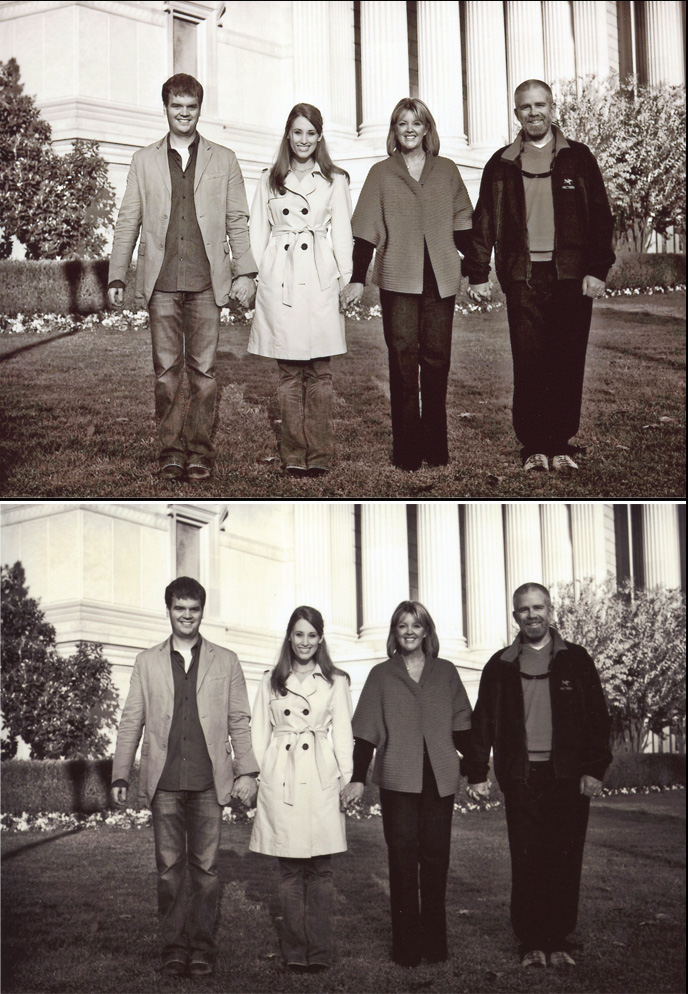
An inspection of the prints reveals:
1) In the Snapfish photo, the shadow thrown by the street lamp on the left of the photo a bit over halfway down, with the main part falling on the hedge, is more defined than in the Shutterfly print with much crisper edges.
2) In the Snapfish photo, the columns of the building in the background are more white, likely falling within a Zone 8-9 category at their lightest.
3) The grass has texture as opposed to the Shutterfly photo where the grass appears a flat, mid-gray blanket.
4) The Crepe Myrtle bush on the right side of the Snapfish photo has more definition compared to Shutterfly’s. You can make out the trunks and the form, shape, and texture of the plant’s top is discernible against the columns. The same goes for the tree on the left.
5) The pansy flowers along the base of the hedge have definition in the Snapfish photo. See flowers on left side of the photo.
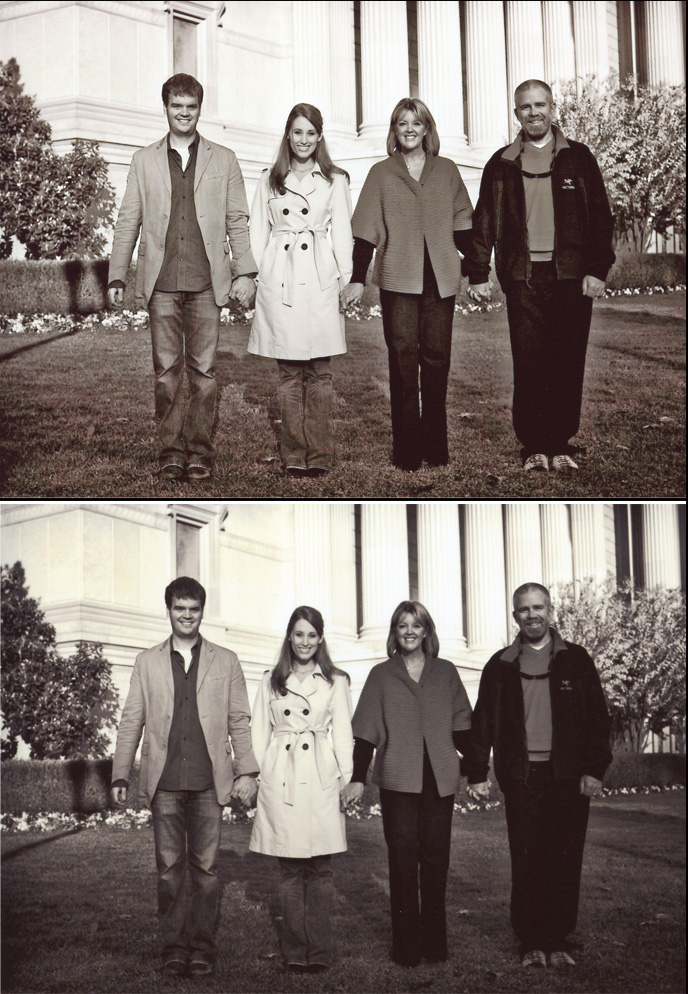
6) Now to the people. Take a look at the pale coat. There is no yellow cast in the Snapfish photo. The buttons pop. Her belt has edges; you can make out the knot. The insignia on the guy’s jacket on the right? You can see it in the Snapfish photo. The faces are bright, well defined. Teeth are white. Hands are noticeable. They’re all wearing jeans. In the Snapfish photo you get the the characteristic lightening at the knees, the whiskers, and hem lines of the couple on the left. The couple on the right were wearing black jeans. But even black jeans, unless they’re being worn for the first time, have discernible weave and wear marks. You can see these in the Snapfish photo. In the Shutterfly photo, their pants are almost pure black and without definition.
7) Taking a look overall at the individuals’ expressions, in the Snapfish photo you can see what it is they’re squinting a bit at – the sun. In the Shutterfly photo you wonder.
The Snapfish photo is the superior Black & White image in this case.
My experience has been that Snapfish prints light. But in this comparison, the photo has the proper contrast and exposure. This simple “they got it right” translates to a photo absent the flat, mostly gray/green blah of the Shutterfly print. The Snapfish photo is sharper in detail, crisper in contrast. It has definition and depth that result from the right balance between the lights and darks within the scene. The photo has life because you can see details of clothing, faces, texture of the grass, and trees – a recognition of substance. I asked Shutterfly to print a B&W photo and instead I got a flat, uninteresting photo with a yellow/green tint (can’t even call it Sepia). It suffers from both underexposure and too-low contrast.
One other notable difference? Shutterfly prints on Fuji paper. Snapfish on Kodak. Is there an inherent difference due to the paper? I don’t know, but tune in to find out!
Links:
SRTs perspective on photography
I see a lot of interesting posts on your blog.
You have to spend a lot of time writing, i know how to save
you a lot of work, there is a tool that creates readable, google friendly posts in couple of seconds, just type in google – k2 unlimited content
Comment by Rueben — July 27, 2014 @ 2:24 am
Good blog! I truly love how it is simple on my eyes and the data are well written.
I’m wondering how I could be notified when a new post has been made. I have subscribed to your RSS which must do the trick! Have a great day!
Comment by Kasha — July 16, 2013 @ 11:55 am
Hello there, You’ve done an excellent job. I will certainly digg it and personally suggest to my friends. I’m
confident they will be benefited from this site.
Comment by Micki — May 1, 2013 @ 10:27 pm
Thanks so much for this valuable info! I’ve been using Snapfish for years & have been happy with their photos. I’ve made many photo gifts, i.e. calendars,etc, & appreciate how quick & easy they make it! I’ve been curious if you’ve come across any differences regarding photo uploading & storage…Look forward to browsing your site
Comment by Celeste — October 12, 2012 @ 11:52 am
Recently ordered same prints from both snapfish and shutterfly. Had never used with service and want to compare quality & service. I got my snapfish prints quickly and they were of great quality. I have yet to receive shutterfly order( both were ordered at same time). Called customer service only to be told the wait time was 60 minutes!!!! What service!! I chose the option to be called back. 1.5 hrs later received call from cust svc in Costa Rica!! They offered to redo order with next day shipping and gave me a receive date of 10 (!!!!) days away!!! Which is 3 weeks from initial order! Unless the pictures are spectacular —the service leaves much to be desired and I plan to be a snapfish customer!!
Comment by Liz — September 13, 2012 @ 8:04 pm
Thank you everyone for your comments. Kari, the results do take some study time – I eye’d them for quite sometime before I was able to verbalize the differences and do a comparison/contrast. I plan to continue doing these comparisons. They are useful for me since I don’t print near as much as I once did. AND I want good prints from vendors. I will continue sharing the results!
Comment by Tammie Dooley — June 30, 2012 @ 8:23 pm
Interestingly upon first glance I thought the Shutterfly print looked better. The Snapfish one looked a bit too stark. But upon reading your review & looking at it more closely I agree with your conclusions.
Comment by Kari — June 24, 2012 @ 7:36 pm
Given the varied results I think that if you wanted more comparison info it would be interesting to order several of the same print from each site. Each instance of each photo in a different order of course so they are printed in different batches. Though unless you added said photos to other orders it would be fairly expensive to order just a few prints in several batches. I think for most complete comparison it would be best to order both B&W and color photos for comparison in the same order/batches. Possibly color prints from the batch of B&W comparison would have been superior at Snapfish also. Maybe it was a better batch in general, paper, operator etc…
Comment by Kari — June 24, 2012 @ 7:30 pm
Thank you. I appreciate you providing this information.
Comment by Stacey — June 6, 2012 @ 12:19 am
Thanks for taking the time to do the comparisons (twice). I’ve been using both Snapfish and Kodakgallery for years but with Kodakgallery being sold to Shutterfly, I’ve been wondering how they are. I’ll have to make time to look through your blog as time permits but just wanted to say “thanks for the info!”
Comment by Renata Hundley — May 31, 2012 @ 12:57 pm
Thank you! i read both this and the last one on Shutterfly vs Snapfish. I’ve had problems with the 4×6 prints from my digital camera, so I will likely go with Shutterfly. but… if I need B&W, I know to go to Snapfish. I assume both companies allow you to store unlimitedly on their site… another point I’ll check out, easily done by visiting them individually.
Thanks again,
Jennifer
Comment by Jennifer — May 11, 2012 @ 7:34 am
[…] Shutterfly vs Snapfish, Take II […]
Pingback by Shutterfly: VividPics Technology — February 9, 2012 @ 6:52 pm
Did you do any prints directly from Kodak? Kodak has some services for optimizing print quality that I don’t think you can get through companies (like Snapfish) that simply use their paper. I’ve noticed a difference as a result.
Comment by LDMartin1959 — December 11, 2011 @ 8:46 am
I have been using Snapfish for years and only had a couple of issues with the coloration of my photos (i.e…my couch is hunter green and it game back more of a turquise blue). I just called them and they were more than happy to send me a new set of prints at no charge. I was intrigued by the comment that Ellie left where Shutterfly offers the ability to print your caption on the back of the photo. That would save me a tremendous amount of time since I sit down and write everyones name/age/date taken on the back of every photo. Thanks for the information!!!
Comment by Kelli — September 15, 2011 @ 8:10 am
I have used Shutterfly for years. On this recommendation, I ordered some prints from Snapfish. The quality was very good. One small disappointment…Shutterfly offers the ability to “caption” each print during the ordering process. I can list who is in the photo/when it was taken. This appears on the back of each print when I receive my order. I just slip them into albums. Done! I contacted Snapfish’s LiveChat,. The rep told me that they do not offer anything like this. They put just the order number/date on every print.
Comment by Ellie — June 21, 2011 @ 1:06 pm
These comparisons are really helpful! Thank you so much for sharing your results! I’m eager to read your final conclusion whenever your reach it. 🙂
Comment by Jen — April 19, 2011 @ 7:45 am
When it comes to photographic printing it all comes down to the paper,the machine and the operator. I work in a camera store and I have been printing for 15 years. Snapfish uses thier cheap HP paper with their own machines. Shutterfly use Noritsu printers with Fuji paper which is much better. Many Camera stores like mine use Kodak paper which I like the best.
Why not try lifepics? If want the best results find a good camera store that uses lifepics and go from thier, They will give advise about your shooting and the results will be way better!
Comment by Todd — February 18, 2011 @ 9:37 am
just keep in mind that on the color comparison, Shutterfly won. I don’t believe the comparison issue is quite done. Snapfish does tend to print light. It’s possible on this particular B&W, it may have been too dark to start with. I’ve got more comparisons to do. I’m not completely satisfied as to which one does the better job.
Comment by Tammie Dooley — January 17, 2011 @ 12:53 pm
The differences are so apparent after the comparison.
I subscribed to your email notification so now I know when you post. Looking back over your posts, I realize how many I’ve missed.
So much photography information and instruction!! What an enormous amount of help for anyone with a camera, serious or casual. And this comparison makes such a difference in the quality of print. You should teach a photography class….in your spare time..!! LOL Thank you for sharing. BTW, I think I know those people!
Comment by ClayMama — January 17, 2011 @ 12:49 pm
What a huge difference you have found…I don’t feel near as good as I did about Shutterfly. Good info!
Comment by James — January 17, 2011 @ 2:17 am
A very thorough and helpful post. It’s amazing how much difference the same photo can have from printer-to-printer. You put so much into your photo’s so it’s helpful for me to have you share some of the detail you go through. I’m curious how the Kodak/ Fuji paper comparison breaks out. I’ll be looking for more! Keep it coming! Nice looking family pic by the way.
Comment by Pops — January 16, 2011 @ 5:24 pm