Shutterfly vs. Snapfish
If you like this post or find it even remotely helpful/informative, leave me a comment, tweet it, or click around on the site a bit with all that spare time you have (there’s no advertising anywhere on here – believe me it’s not for lack of trying). If none of that trips your trigger, then how about joining the Road Trip Revolution at the Solo Road Trip Facebook Fan Page, here.
There is also now a Shutterfly vs Snapfish, Take II.
*****************************
For me, shooting digital has resulted in a screeching halt of printing. I’m guessing it’s the same for you. A local commercial color printer continues to print the captures I want to add to my portfolio, but those are laughingly rare and consist largely from Western China and the Great Plains region of the U.S.
Having discovered Shutterfly a few years ago, I uploaded family photographs taken over that year and had personalized calendars made for Christmas gifts. They were a huge hit and I thought Shutterfly did a good job with them. After that, I began using them for all my printing and various fun photo projects (personalized calendars, coffee mugs, mouse pads, photo albums).
I’ve been happy with the prints, but Snapfish (by HP) caught my attention recently and I thought I’d give them a try. Of course, I wanted to compare, so I had both Snapfish and Shutterfly print identical photos of my 5.6 rated technical summit of Grand Teton.
The upload process was the same – both were fast and without fuss. The total spent at Snapfish for 8-4×6’s and 3-5×7’s, including shipping was $4.05. At Shutterfly, I ordered one more 5×7 by mistake. My total there was $7.67. Since it was my first order with Snapfish, the 4×6’s were free (20 free 4×6’s after your first upload). Shutterfly frequently offers similar deals. Comparing pricing, I surmise they are very similar, even though this order was more with Shutterfly (with the add’l 5×7). Shipping speed was the same- ordered on the same day, received both orders a few days later.
As cameras have dynamic ranges that see the scene differently (see this article on L’heure Bleue – The Blue Hour), printing 4×6’s can be very tricky. Most point-and-shoot cameras have a 4:3 aspect ratio. Translation: upon printing, a 4×6 photo will be cropped somewhere. The fix? Snapfish offers a 4×5.3 “True Digital” option that prints the photo with no cropping. But frames for a 4×6 will not work for this option. Furthermore, several online forums report there IS cropping, even on the 4×5.3 photos. And when I went back to Snapfish to find this option so I could better explain it to you, I couldn’t find it! Made me crazy.
Shutterfly allows you to select your own crop. So you choose the photo, then say you choose the 4×6 print option. A preview screen comes up showing the 4×6 area, and allows you to drag the photo around the space. This means you don’t get a photo back with the sunset at the top missing, or someone’s head cut off (see post about Bad Photography, or Good Photography with a Disposable Camera!). The 4×6 photo will also neatly fit into a frame.
So what about the most important factor – print quality? Shutterfly gets the nod hands-down. The color, ESPECIALLY the skin tones, is markedly BETTER than Snapfish. In the Snapfish photo, my face looks ghostly pale. In the Shutterfly photo, the blacks are blacker, the colors pop – like they’re supposed to.
Shutterfly will continue receiving my business (until someone else catches my attention and I have to do another comparison).
Here are the two photos – both scanned by my cheap-o scanner/printer/fax/copier purchased for $100 six years ago and still buzzing along quite nicely. Pay attention to the overall color, the blacks, and the skin tones.
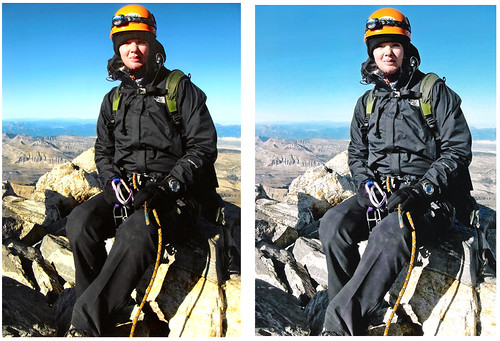
Shutterfly on the Left; Snapfish on the Right
Join the Road Trip Revolution at the Solo Road Trip Facebook Fan Page, here.

 About SRT... I’m a traveler, writer and photographer for whom the open road frequently summons. Adventurous solo road trips are a staple for me, and a curiosity. So I created this website to share them and inspire you to step out and give them a try. Welcome!